
Security · Last updated 2026-04-30
Security, in plain
infrastructure terms.
ShellYard runs as a desktop app, not a browser-only SaaS. Diagnostic output, packet captures, and terminal sessions stay on your machine unless you explicitly attach them to Magellan or share them in a Space. The cloud handles sign-in, sync, audit, and on Enterprise, per-Space customer-managed key isolation.
Where things live · who can decrypt
| Data | Stored where | Who can decrypt | Notes |
|---|---|---|---|
| Personal credentials (Free) | Local AES-256-GCM SQLite vault, master key in OS keychain | Only your OS user | No cloud copy. Vault never leaves the device. |
| Personal credentials (Pro and above) | DynamoDB, envelope-encrypted with AWS KMS in our account | Your Cognito identity (bound via EncryptionContext) | Cross-device sync. DDB stores ciphertext only; ShellYard holds the KMS key — not zero-knowledge. |
| Shared Space credentials (Team and Enterprise) | DynamoDB, envelope-encrypted under that Space's customer-managed KMS key | Members of that Space (group-scoped narrows further) | Each Shared Space gets its own CMK in our AWS account. Same crypto on Enterprise. Cryptographic erasure on Space offboarding. |
| HTTP environment secret variables (Pro and above) | DynamoDB, same envelope as credentials | You (Personal) or Space members (Shared) | Sealed before push. Free keeps them device-local with a masked placeholder pushed. |
| Terminal output, RDP frames, packet captures | Local disk only | You | Never leaves the device unless you attach it to Magellan or share it in a Space. |
| Magellan prompts + responses | Direct: your client ↔ your AI provider | You and your provider | They do not flow through ShellYard infrastructure. |
| Account email, name, billing | Cognito, Paddle (MoR) | ShellYard, AWS, Paddle | Standard SaaS account metadata. Paddle handles payment. |
| Audit log entries | DynamoDB | ShellYard (timestamps + event types) | Per-Space audit log on Team and above. CSV export on Team; per-Space filtering on Enterprise. |
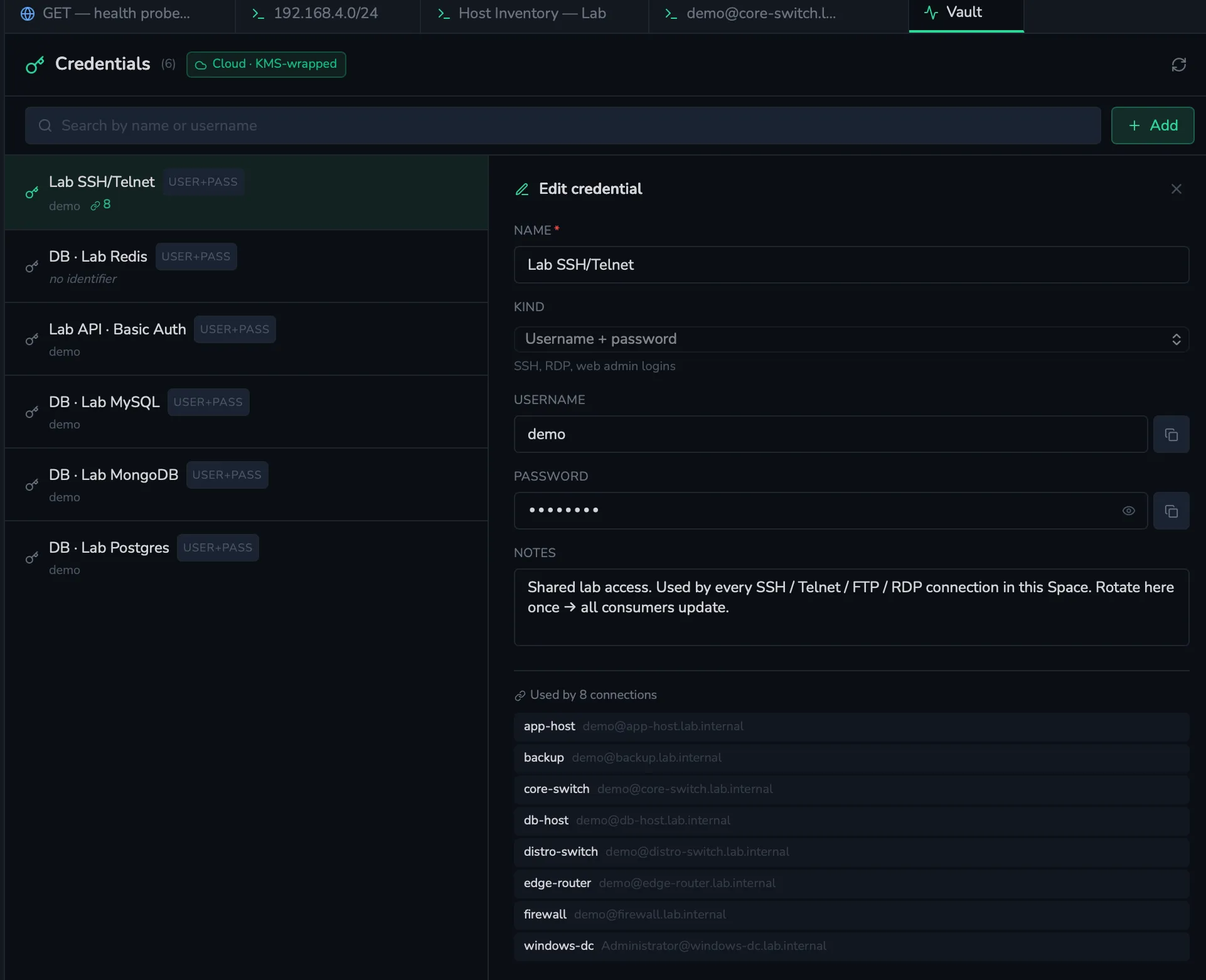
The vault, in one panel
Secrets — credential passwords, API tokens, OAuth client secrets, SSH private keys, and HTTP environment variables marked as secret — are envelope-encrypted with AWS KMS before any cloud sync. Resource metadata (connection names, hosts, ports, folder structure, documents, IPAM data, request URLs and headers) is stored under DynamoDB's encryption-at-rest but is not envelope-wrapped. Free keeps everything on the device in an AES-256-GCM SQLite vault with the master key sealed in your OS keychain — nothing syncs. Pro and above sync the vault to DynamoDB, envelope-encrypted under AWS KMS keys in our account. Team and Enterprise add per-Space customer-managed keys so Shared Space secrets are wrapped with a key scoped to that Space.
This is not zero-knowledge. The KMS keys live in our AWS
account, not on your device. The architecture limits who can call
kms:Decrypt
(via per-user / per-Space IAM policies and EncryptionContext bindings), but with administrative
access to our AWS account we could decrypt your secrets. If you need true zero-knowledge — a key
we cannot reach — keep your secrets on Free where the vault never leaves the device.
Encryption and keys, by tier
Be explicit about where credentials live and who controls the keys at each tier. Enterprise crypto is identical to Team — Enterprise differs on audit-export filtering and admin features, not on encryption strength.
- Free. Credentials live in an AES-256-GCM-encrypted SQLite vault on the device. The master key sealing that vault is held in the OS keychain — Keychain on macOS, Credential Manager on Windows, libsecret on Linux. Nothing syncs off the machine. HTTP environment secrets stay device-local. Cloud services are used only for sign-in / account identity.
- Pro. Personal credentials and HTTP environment secret
variables sync across every machine you sign in to. Each secret is envelope-encrypted: KMS
generates a fresh data key, the client AES-256-GCMs the payload under it, and KMS wraps the
data key under a shared customer-managed CMK in our AWS account. The
EncryptionContexton every wrap/unwrap binds the row to your Cognito sub, so a request to decrypt one user's row using another user's identity fails at the KMS layer. DDB stores ciphertext only — but we hold the CMK. - Team. Same envelope for Personal credentials,
plus a dedicated customer-managed CMK per Shared Space. Credentials shared into a Space
are wrapped with that Space's CMK; KMS authorization gates
Decryptcalls by Space membership, so non-members can't unwrap the data key. Group-scoped credentials add a second gate — a Group DEK (itself wrapped under the Space CMK) that only members of the named Group can decrypt. Removing a member rotates the Group key automatically; even Space admins outside the Group cannot decrypt Group-scoped credentials. - Enterprise. Crypto is identical to Team — same shared
CMK + EncryptionContext on Personal, same per-Space CMK, same Group-DEK gates. Enterprise adds
per-Space audit-log filtering and export, larger document and Space byte caps, unlimited version
retention, and custom annual contracts. Offboarding a Space schedules its CMK for deletion via
kms:ScheduleKeyDeletion; after the AWS pending window expires every secret wrapped under that CMK is permanently unrecoverable — by anyone, including us, because the key material itself is gone. (The same erasure mechanic exists on Team; Enterprise adds the procurement and audit-filtering features that compliance reviews require.)
Move semantics. A credential lives in exactly one (Space, optional Group) at a time. Moving a credential between Spaces or Groups re-encrypts the row under the destination's keys and wipes the source — there is no "share = copy."
Spaces
Spaces are how ShellYard separates clients, sites, teams, or environments. Connections, credentials, documents, audit history, and Magellan context are all scoped to the active Space. Personal Spaces stay completely private — a user's credentials and notes never appear in any team view, ever.
On Team and Enterprise, Shared Spaces add Members, Groups, and folder ACLs with read / write / admin permissions that cascade through the folder tree. Explicit ACLs on a child folder shadow whatever the ancestor grants for that subtree.
Magellan and AI safety
Magellan is human-approved by design. It can explain output, suggest next steps, and draft commands — but every command is reviewed by an operator before execution. The five-stage flow (Explain → Suggest → Draft → Review → Execute) gates protocol-level tool access: in early stages the model can't emit a command, because the command-running tools aren't shown to it.
What Magellan can see
Magellan only receives the context you attach or authorize. ShellYard does not send raw secrets, private keys, or password fields to AI providers by default. The chat shows visible "Attached: <tool> · <size>" pills before send so there is no ambiguity about what the model received.
- Terminal output — if you attach it
- HTTP response (status, headers, body) — if you attach it
- Database query results — if you attach them
- Config diffs and packet captures — if you attach them
- Documents and runbooks from the active Space — if you select / authorize them
- Other tool output (SNMP walk, MTR trace, TLS scan, etc.) — if you attach it
Operators remain in control. Secrets are redacted client-side before the request leaves the device. Cross-Space context never bleeds — Magellan operates inside the active Space only.
BYO AI provider
Magellan is BYO key on every tier. Configure your own API key for the AI provider you choose: Anthropic, OpenAI, Google Gemini, or any OpenAI-compatible endpoint such as Ollama, LM Studio, vLLM, or OpenRouter.
- Prompts and responses pass directly between your client and your chosen provider — they do not flow through ShellYard's infrastructure.
- ShellYard does not store your prompts or responses, and does not log them.
- ShellYard takes no AI markup. You pay your provider what your provider charges.
- For sensitive environments where prompts must stay on-network, point Magellan at a local Ollama / LM Studio / vLLM endpoint — no AI traffic leaves the device.
Vulnerability disclosure
Found a security issue? Email security@shellyard.com. We commit to:
- Acknowledging your report within 48 hours
- Providing a status update within 7 days
- Coordinating disclosure timeline with you
We do not currently have a paid bug bounty program but credit researchers in our release notes.
Compliance
- SOC 2 Type II — in progress; Q4 2026 target. We do not claim certification until completion.
- GDPR — compliant.
- HIPAA — not currently compliant; do not use ShellYard for protected health information.
- DPA — on the roadmap alongside SOC 2 Type II. Security documentation available under NDA today; email sales@shellyard.com.