Security · Last updated 2026-04-30
Security, in plain
infrastructure terms.
ShellYard runs as a desktop app, not a browser-only SaaS. Diagnostic output, packet captures, and terminal sessions stay on your machine unless you explicitly attach them to Magellan or share them in a Space. The cloud handles sign-in, sync, audit, and on Enterprise, per-Space customer-managed key isolation.
Where things live · who can decrypt
| Data | Stored where | Who can decrypt | Notes |
|---|---|---|---|
| Vault credentials (Free) | OS keychain — Keychain / DPAPI / libsecret | Only your OS user | No cloud copy. Vault never leaves the device. |
| Vault credentials (Pro / Team) | DynamoDB, KMS-wrapped | Your client (envelope-decrypts data keys) | Keys are ShellYard-managed. We cannot decrypt at rest. |
| Vault credentials (Enterprise) | DynamoDB, per-Space CMK | Your client, while the CMK exists | Schedule key deletion → cryptographic erasure of that Space. |
| Terminal output, RDP frames, packet captures | Local disk only | You | Never leaves the device unless you attach it to Magellan or share it in a Space. |
| Magellan prompts + responses | Direct: your client ↔ your AI provider | You and your provider | They do not flow through ShellYard infrastructure. |
| Account email, name, billing | Cognito, Paddle (MoR) | ShellYard, AWS, Paddle | Standard SaaS account metadata. Paddle handles payment. |
| Audit log entries | DynamoDB | ShellYard (timestamps + event types) | Per-Space audit log. Team adds CSV export; Enterprise adds filtering. |
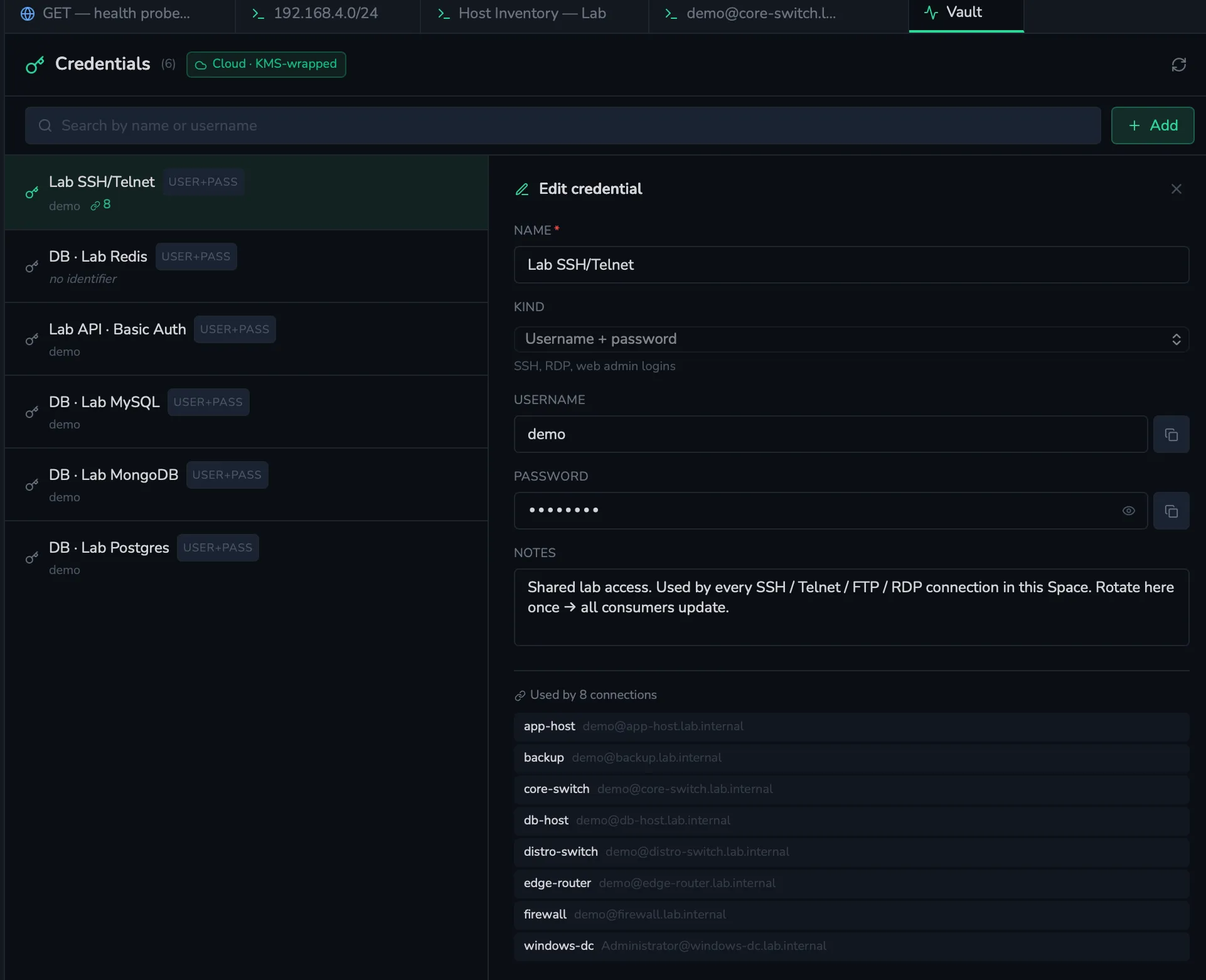
The vault, in one panel
Every credential lives in a single panel. Free keeps the vault in your OS keychain. Pro and Team move it to a KMS-wrapped DynamoDB row that only your client can decrypt. Enterprise gives each Space its own customer-managed CMK, and erasing a Space cryptographically erases the vault entries inside it.
Encryption and keys, by tier
The vault uses different storage and key models depending on the plan. Be explicit about who controls keys at each tier.
- Free. Local OS keychain — Keychain on macOS, DPAPI on Windows, libsecret on Linux. No cloud vault. Cloud services are used only for sign-in / account identity.
- Pro. KMS-wrapped DynamoDB. Each credential is envelope-encrypted client-side using a data key issued by an AWS KMS key in ShellYard's AWS account. Cross-device sync. Keys at this tier are ShellYard-managed, not customer-managed.
- Team. Same KMS-wrapped DynamoDB model as Pro. Spaces are scoped at the application layer via Members, Groups, and folder ACLs. Keys remain ShellYard-managed.
- Enterprise. Each Space gets its own
customer-managed KMS key (CMK) provisioned via
kms:CreateKey. Offboarding a Space schedules the CMK for deletion viakms:ScheduleKeyDeletion; after the AWS pending window expires every credential, document, and version under that Space is cryptographically unrecoverable — by anyone, including us.
Spaces
Spaces are how ShellYard separates clients, sites, teams, or environments. Connections, credentials, documents, audit history, and Magellan context are all scoped to the active Space. Personal Spaces stay completely private — a user's credentials and notes never appear in any team view, ever.
On Team and Enterprise, Shared Spaces add Members, Groups, and folder ACLs with read / write / admin permissions that cascade through the folder tree. Explicit ACLs on a child folder shadow whatever the ancestor grants for that subtree.
Magellan and AI safety
Magellan is BYO key on every tier. Operators configure their own API key for the AI provider they choose — Anthropic, OpenAI, or any OpenAI-compatible endpoint such as Ollama or LM Studio. Prompts and responses pass directly between your client and your chosen AI provider; they do not flow through ShellYard's infrastructure.
Magellan is human-approved by design. It can explain output, suggest next steps, and draft commands, but every command is reviewed by an operator before execution. ShellYard is designed to support scoped prompts and operator review — operators control what context is sent to their selected model. The chat shows visible attachment pills before send, and secrets are redacted client-side before the request leaves the device.
On Enterprise, AI policy controls let you restrict Magellan to specific providers — for example, Ollama-only for sensitive environments where prompts must stay on the local network.
Vulnerability disclosure
Found a security issue? Email security@shellyard.com. We commit to:
- Acknowledging your report within 48 hours
- Providing a status update within 7 days
- Coordinating disclosure timeline with you
We do not currently have a paid bug bounty program but credit researchers in our changelog.
Compliance
- SOC 2 Type II — in progress; Q4 2026 target. We do not claim certification until completion.
- GDPR — compliant.
- HIPAA — not currently compliant; do not use ShellYard for protected health information.
- DPA — on the roadmap alongside SOC 2 Type II. Security documentation available under NDA today; email sales@shellyard.com.